 Card Scanner OCR
Home / How to / Your card as a QR
Show your own card as a vCard QR
My card is not a scan of the paper card in your pocket. You type your details. The app shows them as a vCard QR you can hold up. Until you share, they stay on this iPhone or iPad.
Android later An Android version is planned. There is no Google Play listing, so this is not a download link.
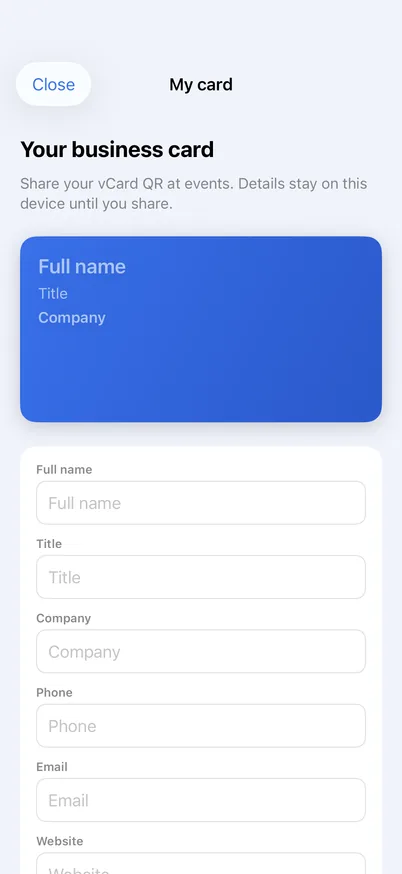
The screen says “Share your vCard QR at events. Details stay on this device until you share.” The fields are full name, title, company, phone, email and website. There is no camera step on this screen. If you were hoping the app would photograph your paper card and turn that photo into the QR, that is not what this screen does. Type the lines you want someone else to receive. Leave off the personal number you do not want on a badge scan.
What the other person gets
They get a vCard, a contact file, when their camera offers to add a contact. They do not get a login to your card list, and they do not get the business cards you scanned from other people. Those stay in your list. Your card and their cards are different data. The list of people you met is the scanning side of the app, starting at how to scan one card.
If their camera shows a block of text, or nothing it knows how to save, stop regenerating the code. Read the phone and email off the My card screen, or hand them the paper card you already carry. A vCard QR is a convenience for phones that import contacts from a code. It is not a promise that every camera will file it. An older phone, a work phone with a locked camera, or a phone that only copies the raw text will not become a contact by itself.
Details stay on the device until you share. Sharing means you chose to show or send the code. It is not an upload that happens because you filled in the form. There is no account attached to My card. If you do not want the details on a particular phone, do not type them on that phone.
What to type, and what to leave blank
Match the paper card you are also handing out, so the QR and the card do not disagree. A title you no longer use is how someone introduces you wrong the next morning. A website with a typo is worse than a blank website. Read it the way you would read someone else's email on Review.
This does not replace scanning the cards you collect. A QR you show and a stack you bring home are the two directions of the same event. The stack still wants Batch, an event name, and a review sitting down. That is after a conference. The QR is so the next person does not have to scan your paper card at all.
Install Card Scanner OCR
My card is in the same app as the scanner. Install Card Scanner OCR on the iPhone you will hold out at the event.