English, Spanish, Russian, German
Those are the recognition languages. A business card in another language is the wrong job for this app, and leaving every switch on is a worse reading than leaving on the one language in your hand.
Android later An Android version is planned. There is no Google Play listing, so this is not a download link.
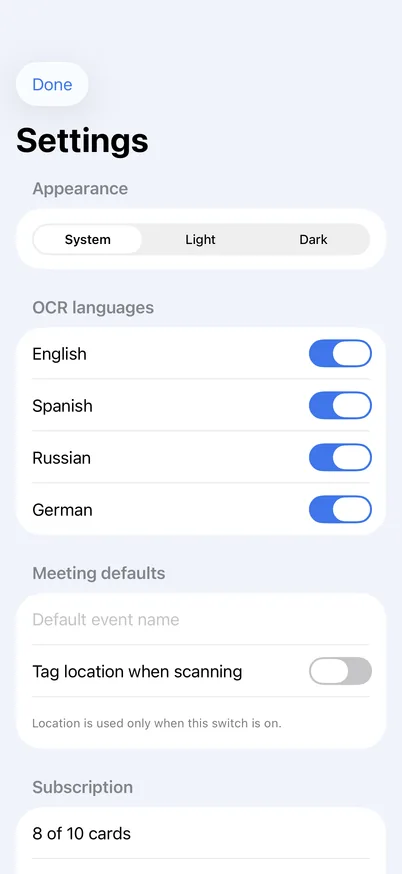
Settings, under OCR languages, lists English, Spanish, Russian and German, each with a switch. The screenshot shows all four on. That is a reasonable default the first afternoon you try the app, and a poor default once you know the pile. A stack of US cards reads more cleanly with English on and the other three off. A stack from a Madrid meeting wants Spanish. A Berlin card wants German. A card from Moscow wants Russian. Turn the others off, scan, and turn them back on only when the pile changes.
What “reads German” does and does not mean
It means printed German, Spanish, Russian or English text on a business card can be recognized on the device. It does not mean a translation. A German title stays German. It does not mean handwriting, and it does not mean a logo. Company names that are invented words get the Check highlight often, in every language, because they are not dictionary words. You still read them. The highlight is explained on fix a misread.
A card set in a fifth language will misread. Type the fields yourself, or do not scan it. Do not install a second scanner mid-conversation hoping for a language this one never claimed. If you are choosing a tool for a language outside these four, this is the wrong app, which is also the point of what it will not scan.
Mixed cards happen: a Spanish company line and an English job title on the same card. For that card, leave both languages on, then read Review more carefully, because the recognizer has more ways to be slightly wrong. Phone numbers and emails are still your job to check character by character. Format and Lowercase do not know the language of a digit.
The recognition itself runs offline, on the phone, whichever of the four you enabled. Language packs are not a download you manage. If a scan fails, it is not because the venue had no Wi-Fi. See scan offline.
Install Card Scanner OCR
The four languages are in the iPhone and iPad app. Install Card Scanner OCR and turn on only the ones printed on the cards you have.